Compare Fitbod, Freeletics and FitnessAI by documented features. Check substitutions, privacy and subscription costs before choosing a workout app.
- Check the plan against your actual equipment and experience.
- A demo or recovery estimate does not verify your technique.
- Test useful features, renewal terms and data controls.
Bottom line Before paying, test one equipment substitution and one completed workout record, then check the renewal and privacy settings.
AI personal trainer apps can suggest workouts and reduce the work of keeping a training log. Check how the app handles your equipment, experience, available time and completed sessions. An algorithm description alone does not answer those practical questions.
This guide compares documented features of Fitbod, Freeletics and FitnessAI, checked October 5, 2026. We have not independently tested their algorithms or verified training results. Use the comparison to choose features to test, then check current device support, subscription terms and privacy controls before paying.
Quick Summary: AI Personal Trainer Apps
- Fitbod: inspect editable strength workouts, exercise substitutions and logging.
- Freeletics: inspect Training Journeys and session adaptations for your constraints.
- FitnessAI: inspect its documented lifting recommendations and workout records.
- Limits: a suggested exercise, demo or recovery estimate does not itself assess your technique or health.
- Before paying: test a substitution, verify the saved record, and check renewal, cancellation and optional permissions.
The Prime Perspective
Choose an app for a task you can test: adapting a workout to your setup, editing completed work or keeping a useful record. Compare the cost and data requirements of that feature before committing to a subscription.
What does “AI personal trainer” mean in practice?
The term can cover recommendation systems, adaptive workout planning and conversational features, each with different functions. A chat response may explain an exercise without checking whether you can perform it; a planning system may adjust sets without observing a repetition.
Ask what information the app uses and what action it takes. Does it use your logged repetitions and weights? Can you set unavailable equipment? Does a change apply to one workout or future plans? Does a camera feature actually observe your movement, and what does its documentation say it can assess? Avoid assuming that every “AI” feature works the same way.
Some apps offer motion-related features, so a blanket claim that apps never observe movement would be wrong. Equally, a video demonstration or suggested load is not personalized technique feedback. If individual technique, pain or a health restriction is the main problem, qualified human guidance may be more useful than a different subscription.
Compare documented features against your training task
| App | Documented function | What to test before paying |
|---|---|---|
| Fitbod | Its getting-started guide describes goals, equipment profiles, editable sets/reps/weight, exercise swaps and exercise instructions. | Remove an unavailable machine, check the substitute, edit actual sets and confirm the saved record. Its recovery estimate should not be mistaken for a clinical measurement. |
| Freeletics | Its training guide describes personalized Training Journeys. Adapt Session can respond to constraints, with choices depending on the Journey. | Test your actual time, equipment and space constraint. Check the revised exercises, work and rest; do not assume every Journey supports every adaptation. |
| FitnessAI | Its official site describes lifting recommendations, exercise guidance, substitutions and workout logging. | Inspect the exercise library, usable starting loads, edit controls and record on your device. Provider descriptions are not independent proof that its recommendations suit you. |
A strength-planning app is a reasonable feature candidate when you want repeatable sets, exercise changes and a clear lifting record. An adaptable bodyweight plan may fit someone whose available time and space change. Neither category automatically provides individually assessed coaching. Choose the task first; then compare how each app handles it.
Check the exact platform and subscription tier you intend to use. Features can differ by operating system, paid tier and current release. Other apps may also suit your task. Our broader fitness apps guide provides context for other app types.
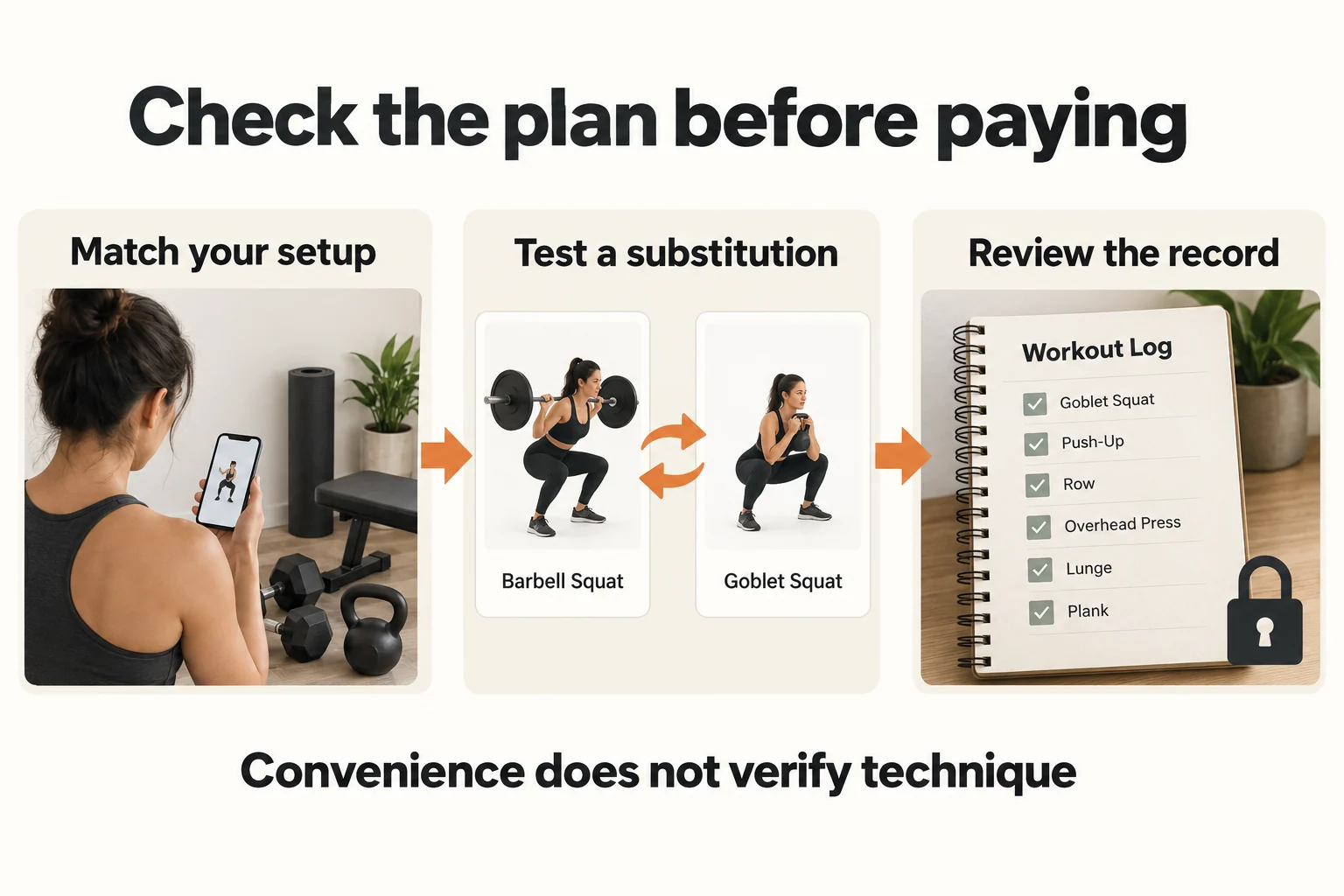
Test an equipment substitution before your first workout
A useful test is simple: set a piece of equipment as unavailable and inspect the replacement. A goblet squat may be a practical option in some plans, but it changes loading and the task compared with a barbell or machine squat. Do not copy a previous exercise’s weight across automatically.
- Set accurate constraints. Enter the equipment you actually have, including usable load range, bench or floor access, and any supported space limits. Do not mark a band anchor as available if you cannot use the manufacturer-approved setup.
- Inspect the substitute. Read the movement instructions, set and repetition target, rest and suggested load. Check whether the movement is familiar and whether you need separate guidance.
- Edit the real session. If you use a different load, fewer sets or a different exercise, record that change. A recommendation based on an inaccurate record has a weaker starting point.
- Check what saved. Reopen the workout. Confirm the exercise, completed sets, weights or band setup, notes and any supported effort entry.
An app should allow you to review a suggestion before doing it. A short session is not automatically easy, and an exercise swap is not automatically equivalent. Stop for pain, dizziness or unusual symptoms rather than treating an on-screen completion target as an obligation.
Check the suggested swap before you train
A generic app replaces unavailable equipment, then the user checks the substitute and workout record. This shows a review process; it does not validate exercise form or an app’s algorithm.
Silent, 8.5 seconds. Open the animation directly. Playback pauses offscreen; reduced-motion preferences keep playback manual. Essential instructions remain in the article text.
Recovery estimates and progression need interpretation
An app may display a muscle-recovery estimate or recommend the next load. That number can be useful for organizing a plan, but it is not a direct measurement of tissue readiness. It may not capture a physically demanding workday, poor sleep, an unlogged sport session or a movement you performed differently.
Look for controls that let you correct the record and adapt the next session. Keep the same exercise name, load unit and equipment setting when comparing sessions. For bands, record the band and setup rather than converting its color to a fixed dumbbell weight. For adjustable dumbbells, verify whether the app records each dumbbell or combined load.
Our strength training at home guide and full-body home workout explain practical starting sessions. Use their instructions to understand the task rather than asking an app to fill every gap in experience. A qualified coach can help with movement and loading questions; a clinician is the appropriate route for medical concerns.
Check subscription costs, trial terms and cancellation
Use the amount displayed at your own checkout. Prices can vary by platform, country, promotion and billing period. A monthly equivalent shown beside an annual plan may still require a full year’s payment upfront. A free download does not imply that personalized coaching is free.
Fitbod’s subscription documentation describes a trial that renews into a paid subscription and different management routes for web, Apple and Google purchases. Check the corresponding terms for whichever app and platform you choose. Deleting an app is not a reliable way to cancel billing.
| Example | Calculation | Meaning |
|---|---|---|
| $15 per month | $15 × 12 = $180 per planning year | A year of recurring monthly payments, before excluded costs. |
| $120 per year | $120 ÷ (52 × 3) ≈ $0.77 per scheduled session | An illustrative plan with three sessions per week. Attendance is not measured or guaranteed. |
| $0 displayed for a trial | Current entry is zero; future renewal may differ. | Record the trial end and actual renewal charge separately. A zero entry is not a promise of a free year. |
The helper uses a 52-week planning year. It excludes taxes, fees, additional purchases, holidays and missed sessions. Cost per scheduled session can compare your assumptions, but it does not tell you whether an app is effective or whether that frequency is suitable. For a fair comparison, use the same attendance assumption for both options.
Set your app checks and compare a subscription cost
Choose your training task and enter the price shown at your checkout. Costs use your entries and a 52-week planning year; they do not represent a live price quote, actual attendance or a recommendation to train on those days.
Compare Fitbod for editable strength planning, Freeletics for adaptable Training Journeys, and FitnessAI for its documented lifting recommendations. Verify your device, checkout, cancellation route and data controls. For annual budgeting, multiply a monthly price by 12; divide annual cost by 52 times your planned weekly sessions for a scheduled-session estimate.
The article tables and downloadable worksheet remain available without JavaScript.
Review privacy before connecting extra data
Begin with the data needed for the feature you want. Review requested permissions before connecting a wearable, health platform, camera or conversational assistant. Ask what is uploaded, why it is used, which parties process it, and what deletion or export controls are available.
Read the current Fitbod privacy policy, Freeletics privacy information or FitnessAI privacy policy for the version you use. Do not assume that every optional feature follows the same data path. Freeletics, for example, describes Coach+ and motion-related processing separately; check the relevant feature rather than treating the whole app as one permission.
- Permissions: can the core workout task work without an optional connection?
- Records: can you inspect and correct what is saved?
- Retention and deletion: what is removed if you delete data or close the account, and what does the policy retain?
- Billing: is account deletion separate from subscription cancellation?
Keep health details out of a chat unless you understand the feature’s purpose and policy. An app’s answer is not a confidential clinical consultation. Our wearable fitness technology guide helps separate device functions from health interpretations.
Keep your worksheet away from the screen
Download the one-page workout app trial worksheet (fillable PDF). Its eight editable fields keep the details and questions for this topic together; it also works for handwritten notes. The helper’s print button creates a separate record containing your current selections, notes and checkmarks.
Provider video: how the Freeletics Coach uses feedback
Freeletics explains its coaching process in this older provider overview. Treat it as a commercial explanation of the concept, not independent proof of safety or results. Interfaces and current features may differ; the comparison uses the current documentation linked below.
Watch the source video on YouTube if the embed does not play.
Conclusion: use a week to test the features
This is a review sequence, not a claim that every app offers a seven-day free trial. Stay within the actual trial terms or use accessible demonstrations before purchasing. One week cannot establish long-term strength, health or adherence benefits.
- First check: confirm device support, your equipment profile, billing period and renewal date.
- Before a suitable session: test one unavailable-equipment change and inspect the full replacement.
- After the session: correct the actual work and reopen the saved record. Note whether edits are easy to find.
- Before the trial or renewal deadline: review optional permissions, cancellation steps and unresolved problems. Keep the app only if its useful features justify its cost and data use for you.
Optional equipment for compatible app plans
Buy equipment only when your chosen plan supports its exercises and setup. Neither item is needed for an equipment-free program, and suitable equipment you already own can serve the same task.
As an Amazon Associate, PrimeForMen earns from qualifying purchases. Check the exact selected version, package, seller and current instructions; prices and offers can change.
Best for: For an app plan with appropriate dumbbell exercises and a usable starting load. Skip them for equipment-free plans or if you already own suitable weights. Current Amazon listing: PowerBlock Elite EXP 90 Adjustable Dumbbells, Stage 1, Set of 2, 5 lb-50 lb Best for: For a plan that supports the band variations and approved setup you can actually use. Skip them if the app assumes different bands or an unavailable anchor. Current Amazon listing: Resistance Bands, Pull Up Assist Bands - Workout Bands, Eexercise Bands for Working Out, Fitness, Training, Physical Therapy for Men Women - Multicolor * As an Amazon Associate, PrimeForMen earns from qualifying purchases.Recommended Products

PowerBlock Elite EXP Stage 1 dumbbell pair
View on Amazon

Long-loop resistance bands
View on Amazon
Frequently asked questions
Can an AI app replace a personal trainer?
It can automate some planning and logging tasks. That does not establish individually assessed technique, medical suitability or the value of human coaching. Choose qualified guidance when those are the tasks you need.
Which app is best for a home gym?
Start with the equipment and task. Inspect editable strength planning in Fitbod, adaptable Training Journeys in Freeletics and lifting recommendations in FitnessAI. Test the exact feature and platform rather than choosing by a universal score.
Does an app check my exercise form?
A demo or workout suggestion does not itself observe your form. Some apps offer camera or motion-related features; check what the particular feature measures and its limitations. Do not assume it provides a professional assessment.
Is an annual subscription always better value?
It can have a lower listed annual cost, but the payment commitment and likelihood of continued use matter. Check cancellation and refund terms. Compare with your own inputs; an estimated session cost is not actual attendance or effectiveness.
Do I need weights or a wearable?
Only if the chosen plan or feature needs them. Bodyweight programs may use neither. Existing suitable equipment is enough for its supported exercises; optional data connections and purchases should serve a specific task.
Medical Disclaimer
This is general exercise and app-selection education, not diagnosis, rehabilitation or an individually assessed program. Stop for pain, dizziness or unusual symptoms; severe symptoms, including chest pain, need urgent help. Seek guidance for medical restrictions.
Generated editorial imagery and diagrams are illustrative. They do not show measured hormone changes, personal product testing or validated exercise technique.
Equipment suggestions use documented product listings and task fit, not hands-on testing. As an Amazon Associate, PrimeForMen earns from qualifying purchases.
Sources and comparison scope
Checked October 5, 2026. Comparison uses official documentation, not hands-on testing, independent algorithm evaluation or verified outcome claims. Provider video is identified as such. See our editorial policy.